ClickUp is a cloud based project management / ToDo environment. (url: https://clickup.com/?noRedirect=true).

This Python package adds some functionality that is currently not present.

It allows you to:

  • shift tasks (by a number of days),
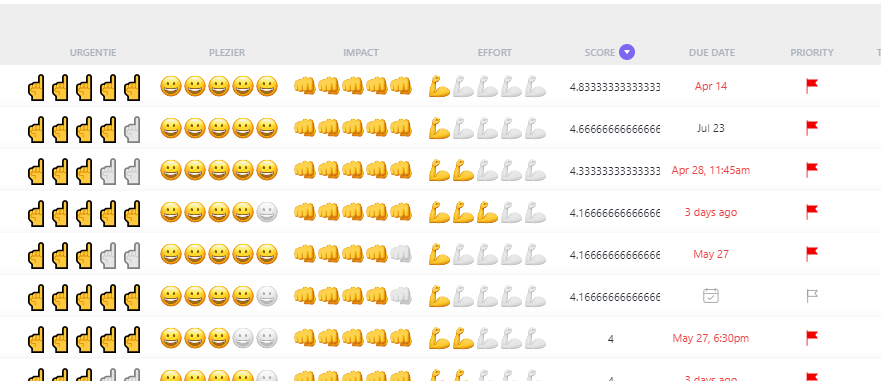
  • score tasks (by using 4 custom fields),
  • based on the score give them a priority.

Reference to those custom fields have been hard coded. Therefore, scoring will not work out of the box, shifting tasks should work.

When you add the following fields the code could work, although the field references have been hard coded.
drawing

Install

pip install ClickUpShiftScore

How to use

Load the module and add your API code when you create an instance of CU.

from ClickUpShiftScore.core import *


test = CU("pk_42327425_CWKU0F6UMM3Q62KMJ6UDG0BL1RE20AFA")


test.updatetasks("score", 1)
Achter computer of buro
score updated for: 
Keizer of divino boeken 
score updated for: 
trouw opzeggen
Huis
score updated for: 
koffie kalk
Op pad / Naar Winkel
Gezinsplanning
Projecten
test.updatetasks("priority", 10)
Achter computer of buro
prio updated for: 
Keizer of divino boeken 
prio updated for: 
trouw opzeggen
prio updated for: 
Python webscrape magister
prio updated for: 
Python Development
prio updated for: 
Outlander naar garage voor regulier onderhoud 
prio updated for: 
chrores up
prio updated for: 
proces gele doekjes
prio updated for: 
Planning Simon in deze tool
Huis
prio updated for: 
koffie kalk
prio updated for: 
Fix hue
prio updated for: 
deurdempers
prio updated for: 
messen wisselen
Op pad / Naar Winkel
Gezinsplanning
prio updated for: 
vakantie plannen
Projecten
prio updated for: 
pyton code in mapjes
test.updatetasks("shift", 7)
Achter computer of buro
int() argument must be a string, a bytes-like object or a number, not 'NoneType'
Keizer of divino boeken 
int() argument must be a string, a bytes-like object or a number, not 'NoneType'
trouw opzeggen
int() argument must be a string, a bytes-like object or a number, not 'NoneType'
Python webscrape magister
int() argument must be a string, a bytes-like object or a number, not 'NoneType'
Python Development
int() argument must be a string, a bytes-like object or a number, not 'NoneType'
Outlander naar garage voor regulier onderhoud 
int() argument must be a string, a bytes-like object or a number, not 'NoneType'
proces gele doekjes
int() argument must be a string, a bytes-like object or a number, not 'NoneType'
Dempers
int() argument must be a string, a bytes-like object or a number, not 'NoneType'
QR codes onderhoud
int() argument must be a string, a bytes-like object or a number, not 'NoneType'
hor evi
int() argument must be a string, a bytes-like object or a number, not 'NoneType'
tennis tournoeien
int() argument must be a string, a bytes-like object or a number, not 'NoneType'
contributie tennis
int() argument must be a string, a bytes-like object or a number, not 'NoneType'
Markt in agenda
int() argument must be a string, a bytes-like object or a number, not 'NoneType'
pinpas zakelijk
int() argument must be a string, a bytes-like object or a number, not 'NoneType'
Garantie stofzuiger
Huis
int() argument must be a string, a bytes-like object or a number, not 'NoneType'
Bed pepijn maken
int() argument must be a string, a bytes-like object or a number, not 'NoneType'
koffie kalk
int() argument must be a string, a bytes-like object or a number, not 'NoneType'
Fix hue
int() argument must be a string, a bytes-like object or a number, not 'NoneType'
deurdempers
int() argument must be a string, a bytes-like object or a number, not 'NoneType'
bewarkings cameras
int() argument must be a string, a bytes-like object or a number, not 'NoneType'
grasmaaier huisje
int() argument must be a string, a bytes-like object or a number, not 'NoneType'
onkruid
Op pad / Naar Winkel
Gezinsplanning
Projecten
int() argument must be a string, a bytes-like object or a number, not 'NoneType'
spotifyapi backup

Documentation

Please view this documentation to see the documentation for all modules and functions.

mermaid
flowchart LR

subgraph Init
    A1[Initit] -->|API key| B1[[self.API key]]
    A1 --> C1[[self.folderdata]]
end

subgraph updatetasks
    A[updatetasks] 
    C1 --> |Folderdata| A
    B1 --> |API key| A

    A --> C{Choice}
    C -->|score| D[updatescore]
    C -->|shift| E[shiftstartandduedate]
    C -->|priority| F[updatepriority]

end

Init --> updatetasks
mermaid
sequenceDiagram
    autonumber
    actor User    
    participant test as test #58; CU
    participant updatetasks as updatetasks #58; test
    participant urlrequest as urlrequest #58; helper 
    participant updatescore as updatescore #58; helper
    participant shiftstartandduedate as shiftstartandduedate #58; helper
    participant updatepriority as updatepriority #58; helper
    User->>test:Init (with API key)
    Note over User, test: User folders stored during init.
    User->>updatetasks: updatetasks("score", 1)

    loop folders
        rect rgba(0, 100, 255, .1)
        Note over updatetasks, urlrequest: Loop over folders to get the lists
        updatetasks->>urlrequest: urlrequest(folderid)        
        urlrequest->>updatetasks: listdata

        loop lists
            rect rgba(0, 100, 255, .1)
        Note over updatetasks, urlrequest: Loop over lists to get the tasks
        updatetasks->>urlrequest: urlrequest(listid)
        urlrequest->>updatetasks: taskdata
        Note over updatetasks, updatepriority: for each task in a list one of following options is run [score, shift, priority] 
        autonumber 7
        rect rgba(0, 100, 255, .1)
        alt is score

            updatetasks->>updatescore: updatescore(field, task, score)
        autonumber 7
        else is shift
            updatetasks->>shiftstartandduedate: shiftstartandduedate(task, startdate, duedate, dagen, apikey)
        autonumber 7
        else is priority
            updatetasks->>updatepriority: updatepriority(task, score, apikey)

        end    
        end

        end
        end
    end
    end